

of the highest quality remote captioning anywhere, period.
More and more businesses and events have moved to a virtual environment. Accessibility is crucial, now more than ever. TotalCaption’s team of trained CART Providers seamlessly make realtime captions available on numerous online platforms so all virtual attendees can participate.
Experience the TotalCaption Difference!
Certification

Our Captioners all have the highest certification available designated by NCRA, the Association for Court Reporters and CaptionersExpertise
Expert technical and backup support staff
Experience
Our Captioners, who have an average of over 13 years experience, specialize in specific subjects/fields, such as medical, scientific, technical, arts and theater.
Support
Human assistance (never AI) from beginning to end
Benefits
- Free demo to ensure the optimal captioning solution
- Free transcript at the conclusion of your event
- Free preparation (CART Providers enter speakers’ names, keywords, esoteric terms into their captioning software to ensure accuracy)
Security
Security and protections based on the platform and your individual needs
Translation
Multi-language realtime translation for non-English speaking participants
Customized Captioning Instructions/Settings for Zoom

TotalCaption has prepared a set of two simplified customized instructions for clients who want to use live human captions for their Zoom meetings and webinars. These two documents are all you need to ensure a successful captioning setup.
Step 1
In order to get live human closed captions in Zoom, this feature must first be enabled in the host account settings. Click below to get started.
How to Enable Live Human Closed Captions in Zoom (Global Account Settings)
Our simplified Zoom instructions only takes a minute and encompasses all you need to know and what to do to enable live human captions to your event.
- Sign in to the Zoom web portal (through the web and not via mobile device) as an admin with the privilege to edit account settings. This needs to be done in the host account and MUST be done prior to the host starting the live event.
- Click on My Account in the upper right corner
- In the navigation menu, click Settings.
- With the window on full screen, click on In Meeting (Advanced).
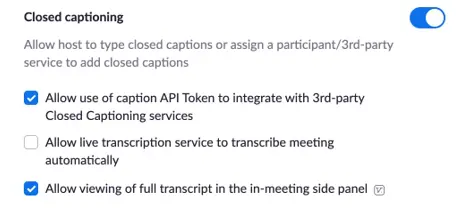
- Make sure the Closed captioning feature is enabled (Blue means enabled).
- Check Allow use of caption API Token to integrate with 3rd-party Closed Captioning services.
- Check Allow viewing of full transcript in the in-meeting side panel.
- DO NOT CHECK ALLOW LIVE TRANSCRIPTION SERVICE TO TRANSCRIBE MEETING AUTOMATICALLY. THIS WILL INTERFERE WITH THE LIVE HUMAN CAPTIONING. When you are done, this section should look like the following:
Should you make these changes while the event is live, all participants must leave the meeting and rejoin after the host makes these setting changes.
Step 2
Now that the host account settings in Zoom have been enabled for captions, the next step is to choose the live human captioning setup that is best for your unique event. Here is how to do it properly:
How to Start Live Human Closed Captions in Zoom (Individual Meetings and Webinars)
How to start Live Human Closed Captions in Zoom meetings and webinars
To start Live Human Closed Caption in a Zoom meeting or webinar:
- In a Zoom meeting or webinar, the host should see either of the following buttons on the bottom of the Zoom screen.
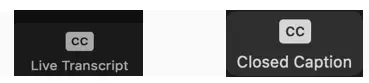
(Please note: If the host does not see either of these buttons, please refer to TotalCaption’s Customized Settings to Enable Live Human Closed Captions) - If you see the LIVE TRANSCRIPT button, make sure you Do Not enable the Live Transcription Button and Do Not check Allow Participants to request Live Transcription. (Please note: If either of these are enabled, this will interfere with Live Human Captioning.) Your screen should look like the following:
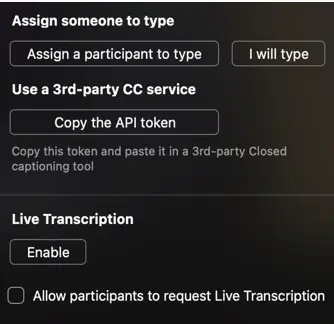
- Now you are ready to choose to either “Assign a participant to type” or to “Use a 3rd Party CC Service (Copy the API token).” These two options should be discussed with TotalCaption to determine which setting is preferred based upon your unique event.
To assign a participant to type closed captions the host should:1. Click Assign a participant to type. The participants window will open.
2. Find the participant who you want to type closed captions and hover over their name.
3. Click More.
4. Select Assign to type Closed Caption.
Please Note: For Zoom Webinars, the captioner must be a panelist in order to be assigned to type closed captions.
To use a 3rd-party CC service the host should:
1. Click Copy the API token (This token, which is a URL, will automatically be copied to the clipboard.)
2. Paste and send the API token to TotalCaption. We, or the assigned captioner, will input this token to integrate captions in Zoom.